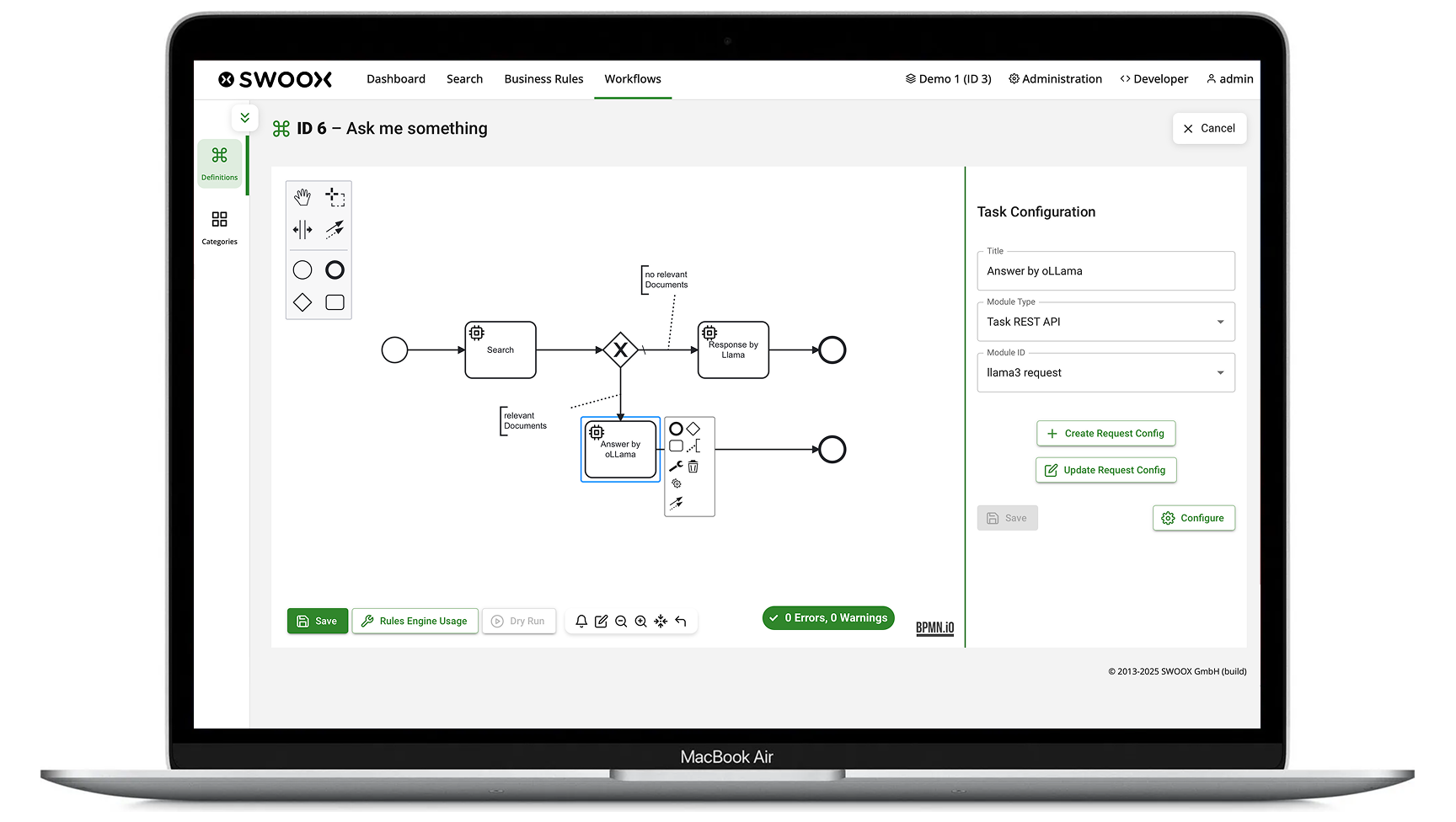
- Blog-Kachelbild:

With the Release 9.5.0, swoox.io introduces a flexible and fine-grained role and permission management system that serves as the foundation for even more efficient process automation. This allows access to be precisely controlled so that users only have access to the areas and actions relevant to them. The new management system offers intuitive configuration, enhanced security, and simple administration – especially for companies with multiple tenants, complex team structures, or high compliance requirements.
How does the new role & permission system work?
Permissions in swoox.io are defined on two levels:
- Function level:
Control of access to core modules such as Workflows, Business Rules, or the Search Engine – each of these areas has at least one role
- Action level:
Detailed control over which actions are allowed within a module (e.g., editing or deleting workflows) – these permissions are subordinate to the respective areas
Thanks to the new hierarchical structure, permissions can be managed efficiently and flexibly adapted to different user groups – ideal for managing complex automation processes.
Example: If a user is granted permission for the Business Rules area, they have access to all functions and actions within this area. If, in the Workflow area, only the permissions to start and monitor are to be granted, this can be set independently of the Business Rules area. This allows process automation to be controlled and optimized in a granular way.
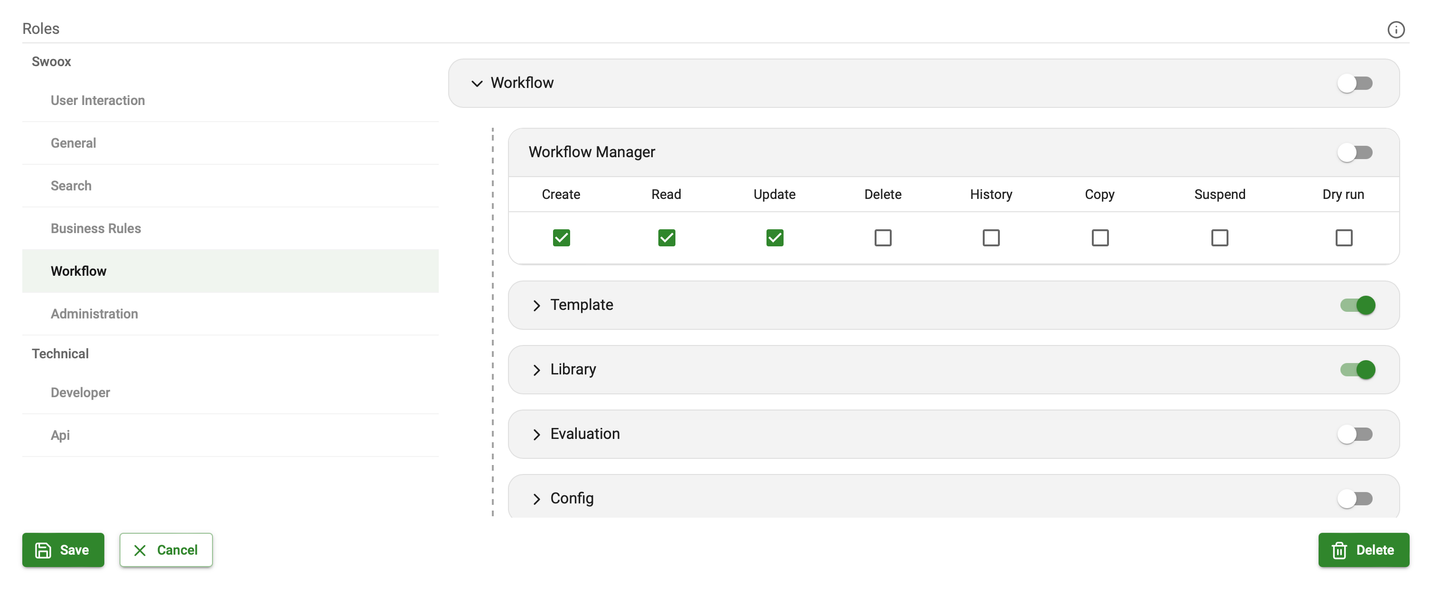
Simple administration thanks to the new UI
To minimize administrative effort, a new role management system has been integrated into swoox.io via theGroup Manager.
Here you can:
- Define and manage roles – with individually assigned permissions
- Create user groups – and assign them bundled roles
- Assign tenants to user groups – for targeted access control
Configuration is done via an intuitive UI that dynamically adapts to the available roles and enables transparent control.
Multi-tenant capability for maximum flexibility
Swoox.io makes it possible to assign rights not only to individual users but also on a tenant basis. This means that companies with multiple locations, brands, or customer projects can precisely control who has access to which content and functions.
When grouping roles,user groups can be linked to one or more tenants. This allows permissions to be set either globally for all tenants or individually for each tenant and its specific automation requirements.
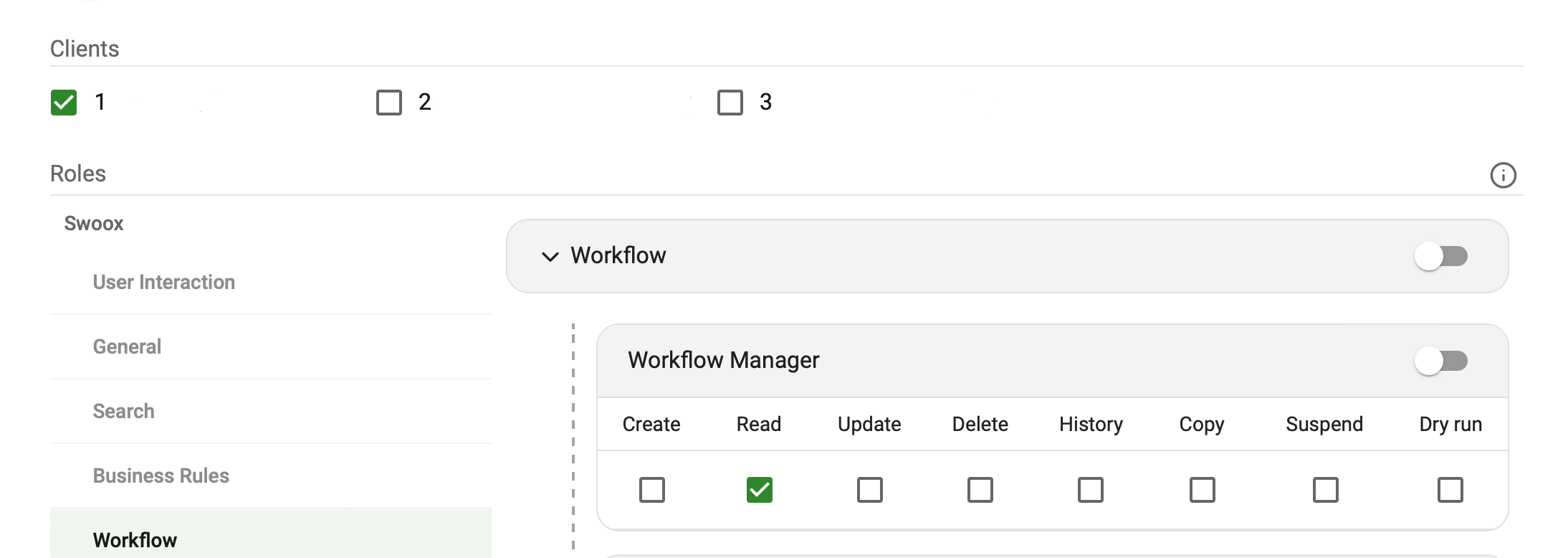
The role and permission system in swoox.io 9.5.0 thus ensures detailed and precise control of access to all functions and actions – both at the tenant and user level.
Conclusion: More control and security
The new role and permission management makes swoox.io even more powerful. You benefit from clearly structured user management, reduced error rates, and efficient organization of permissions – even in complex environments. This ensures more effective and scalable implementation of automation processes. Companies with strict compliance requirements or data security demands in particular will appreciate the new possibilities.
Curious about the new possibilities?
Request a Demo Now
- Blog-Kachelbild:

In the world of generative AI, Retrieval-Augmented Generation (RAG) has established itself as a powerful method to provide Large Language Models (LLMs) with up-to-date and domain-specific information. But how can such a system be implemented seamlessly in practice?
The answer: swoox.io – a modern automation and integration platform that makes RAG projects efficient, scalable, and maintainable.
The Use Case: RAG with Firecrawler, swoox.io, and Ollama
In a real-world project, a complete Retrieval-Augmented Generation workflow was implemented using the following components:
- Data acquisition with Firecrawler
The website swoox.io was crawled using Firecrawler. Relevant content was extracted and stored in an internal data repository – forming the basis for the retrieval part of the RAG system.
- Automated data processing with swoox.io
The entire process chain – from crawling to indexing to query processing – was orchestrated by swoox.io. The platform served as a central hub for all automation and integration tasks.
- Answer generation with Ollama (local Large Language Model)
Relevant documents were identified through semantic search and passed to a locally hosted LLM (Ollama), which generated context-aware answers.
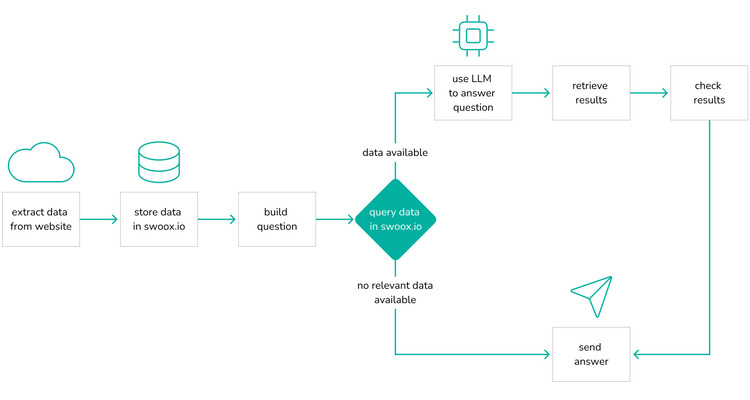
Example RAG Architecture with swoox.io
- Firecrawler: Crawls and extracts relevant content
- swoox.io: Orchestrates the entire workflow
- Vector search: Finds semantically relevant documents
- Ollama: Generates precise, context-aware answers
Why swoox.io? The Benefits at a Glance
- Low-code automation for complex AI workflows
swoox.io allows complex data pipelines and integrations to be built without deep programming knowledge. This accelerates development and significantly lowers the entry barrier for RAG projects.
- Seamless integration of diverse tools
Whether Firecrawler, vector databases, LLMs like Ollama, or external APIs: swoox.io connects all components through standardized interfaces and event-driven workflows.
- Scalability and reusability
Once created, workflows can be easily adapted, duplicated, and applied to other use cases. Ideal for companies operating multiple RAG applications or scaling their projects.
- Transparency and monitoring
Integrated dashboards and logging features allow developers to always maintain an overview of the status and performance of their RAG pipelines.
- Data sovereignty through local processing
Using local LLMs like Ollama ensures that data processing remains fully under internal control – a key advantage for data-sensitive industries such as healthcare, finance, or legal.
Typical Use Cases for Local RAG Systems
RAG systems with local data processing allow companies to safely combine generative AI with internal knowledge – without cloud dependency. Here are some concrete use cases:
- Internal knowledge bases & employee support
- Application: Automated answers to internal questions about processes, policies, IT systems, or HR topics.
- Benefit: Less support effort, faster onboarding, better self-service options.
- Compliance & legal departments
- Application: Analysis and interpretation of internal policies, contracts, or regulatory texts.
- Benefit: Reduced risk, better decision-making, support during audits.
- Product development & R&D
- Application: Access to internal research reports, patents, technical specifications.
- Benefit: Faster innovation cycles, better utilization of existing knowledge.
- Sales & marketing
- Application: Creation of personalized offers or presentations based on CRM and product data.
- Benefit: Higher conversion rates, better customer targeting, time savings.
- Industry & manufacturing
- Application: Support in maintenance, troubleshooting, and training through access to machine manuals and maintenance logs.
- Benefit: Reduced downtime, more efficient maintenance, better onboarding.
Key Advantages of Local RAG Systems at a Glance
| Advantage |
Description |
| Data sovereignty |
No sensitive data leaves the company – ideal for GDPR compliance. |
| Domain-specific knowledge |
LLMs are enriched with company-internal knowledge for more precise and relevant answers. |
| Cost efficiency |
Reduction of licensing costs through local models and open-source technologies. |
| Flexibility |
New data sources or documents can be integrated easily. |
| Offline capability |
Can be used in isolated networks – e.g., in industry or government agencies. |
Conclusion: swoox.io as an enabler for production-ready RAG systems
swoox.io makes implementing RAG applications not only easier but also more robust and scalable. The platform provides everything modern AI projects need: automation, integration, transparency, and flexibility. Companies that want to use RAG seriously in practice will find a strong partner in swoox.io.
- Blog-Kachelbild:

With this release, we are taking swoox.io a big step forward: a modernised design, expanded workflow functions, improved data protection options and a new plugin system ensure greater flexibility, transparency and future-proofing.
The update is aimed both at users who work with workflows on a daily basis and at technical teams who want to expand swoox.io in a targeted manner and integrate it into modern system landscapes.
Highlights of the release
Important new features
- MCP integration: Provide workflows as tools for AI agents
- New design: Modern colour scheme, redesigned login screen and new menu
- Workflow input/output validation & array support: Greater transparency for schema changes and flexible data transfers in workflow tasks
- Plugin Manager: Flexible extension of swoox.io
- Data protection & clean-up: Easy deletion of personal data, logs and incorrect workflow messages
Improvements & optimisations
- Intuitive, dynamic menu with plugin extensibility
- Advanced management and cleaning of workflow logs
- Performance and stability improvements through framework updates
Bug fixes & maintenance
- Technical modernisation to the latest Symfony LTS version
- React minor updates for a more stable user interface
New features in detail
MCP integration
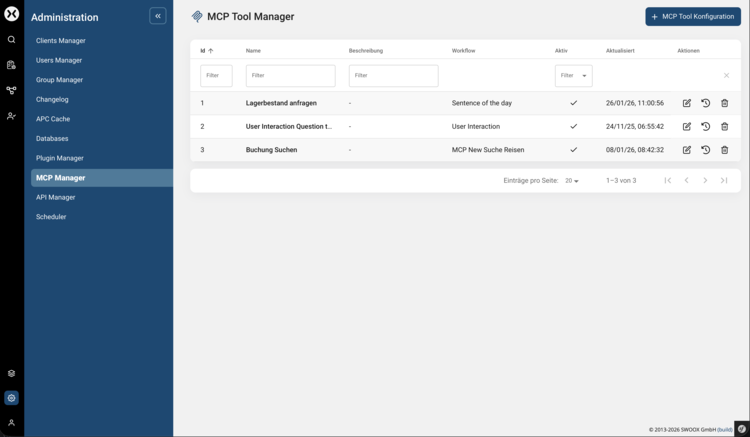
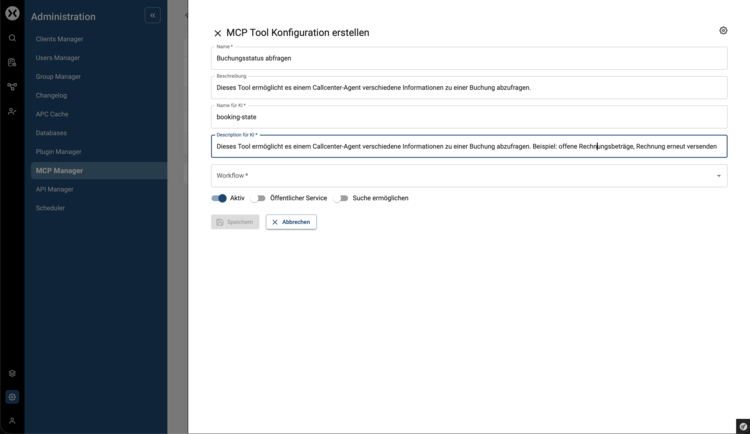
With the new MCP integration, workflows can be provided as tools via the Model Context Protocol (MCP). This allows workflows to be controlled and executed directly by AI agents – an important step towards AI-supported automation.
You can find out more about how companies use AI in business processes in the article ‘How swoox.io makes business processes usable for AI agents via MCP’.
Overview of the MCP tools provided:
Making a workflow available as an MCP tool:
New design
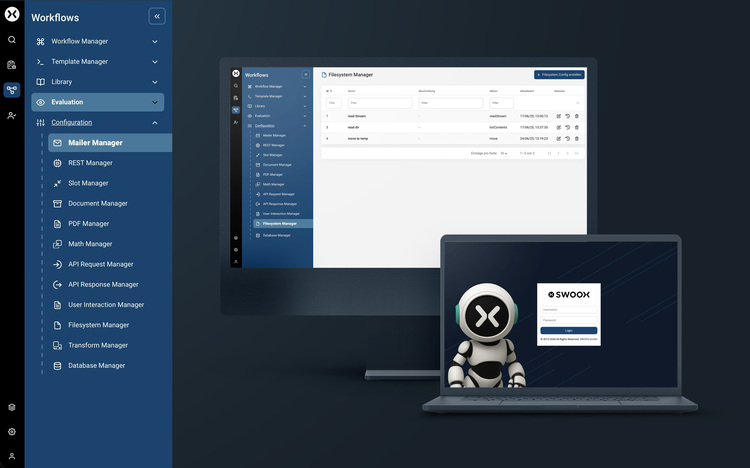
The swoox.io user interface has been comprehensively modernised. A new color scheme, a redesigned login screen and a new navigation concept ensure a more consistent, clearer and more accessible user experience.
The new, dynamic navigation replaces the previous top menu and enables faster access to central functions. At the same time, it is prepared for future plugin extensions.
Workflow input/output validation & array types
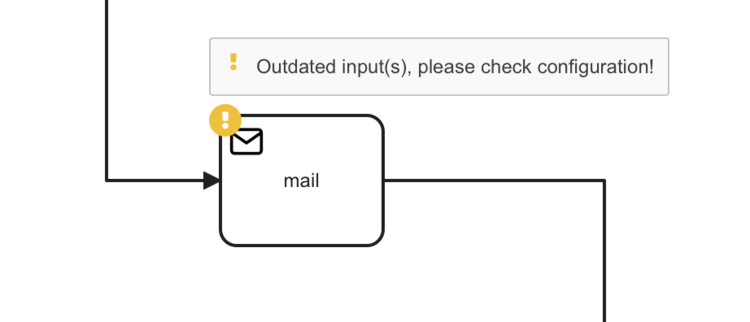
Schema changes to outputs are now recognised and displayed in workflows. Users are notified when an output schema has changed
Schema changes to other outputs are now displayed in workflows and users are notified when an output schema has changed.
In addition, inputs and outputs in workflow tasks can now also contain the array type. This allows, for example, multiple values to be transferred simultaneously or lists of data to be processed – ideal for more complex workflows and automated processes.
Plugin Manager
Swoox.io can be flexibly expanded via a new plugin system. Plugins can be installed, managed, and enabled or disabled either via console commands or conveniently via the intuitive user interface.
Data protection & cleanup
Workflow logs can be managed directly in the interface. Personal data can be completely deleted, old or no longer needed logs can be removed, and faulty workflow messages (workflow_failed) can be specifically cleaned up – for greater security, clarity and compliance.
Next steps & feedback
We are continuously developing swoox.io. Upcoming features include:
- Loop function with sub-processes
- Workflow cron job control
Do you have any suggestions or feedback on this release? We look forward to hearing from you!
🔗 Request a demo now
💬 Give feedback: Contact us
- Blog-Kachelbild:

With the new User Interaction module in swoox.io 9.5.0, you can pause workflows at specific points to request manual data input from the user. This feature increases flexibility, ensures user-friendly interaction, and simplifies the integration of user feedback into automated processes.
The User Interaction module is designed for companies that not only want to automate their workflows but also require user-specific input. Especially in processes where certain data needs to be manually reviewed or added, this feature offers great benefits. Typical scenarios include approval processes, order handling, or the collection of specific user information in various use cases.
What is User Interaction and how does it work?
TheUser Interaction module in swoox.io allows workflows to be paused at defined points so users can manually enter the required information. This is achieved through a new task that can be integrated into your workflow.
How it works:
- Pausing the workflow: At a defined point, the workflow is stopped and the user is prompted to enter the required data.
- User-friendliness: The input mask is clear and focuses only on the necessary fields, so the user is not overwhelmed with unnecessary information.
- Data validation: After entry, the data is validated to ensure correctness.
- Seamless integration: Once the data has been entered and validated, the workflow continues seamlessly.
Typical use cases
Approval processes
In an automated approval process, aUser Interaction can be used to enable the approval of decisions or documents. The workflow is paused at a certain point to request user approval before continuing.
Order processes
When handling orders, aUser Interaction can be used to ensure that all relevant information (e.g., delivery address, payment details) is entered before final processing.
Data collection
In processes where specific user data must be collected – for example, in surveys or forms – aUser Interaction ensures that users can conveniently and efficiently provide the required data.
Conclusion – More flexibility and user focus
The introduction of theUser Interaction module in swoox.io makes workflows even more user-friendly by integrating manual input at the right time into the automated process. This feature provides greater flexibility and better alignment with the needs of your users and processes.
Take advantage of this new capability to make your workflows more interactive and efficient. With User Interaction, we provide you with a powerful tool that aligns your automation processes even more closely with your requirements.
Curious about the new possibilities?
Request a Demo Now
- Blog-Kachelbild:

With the new release of swoox.io 9.5.0, our automation platform introduces a key enhancement: versioning of workflows and templates. From now on, changes can be tracked, documented, and previous versions restored if needed.
This is a major advantage, especially for teams that work on workflows regularly. Versioning provides better oversight, simplifies troubleshooting, and ensures that no changes are lost.
Automatic Version History: Keep All Changes in View
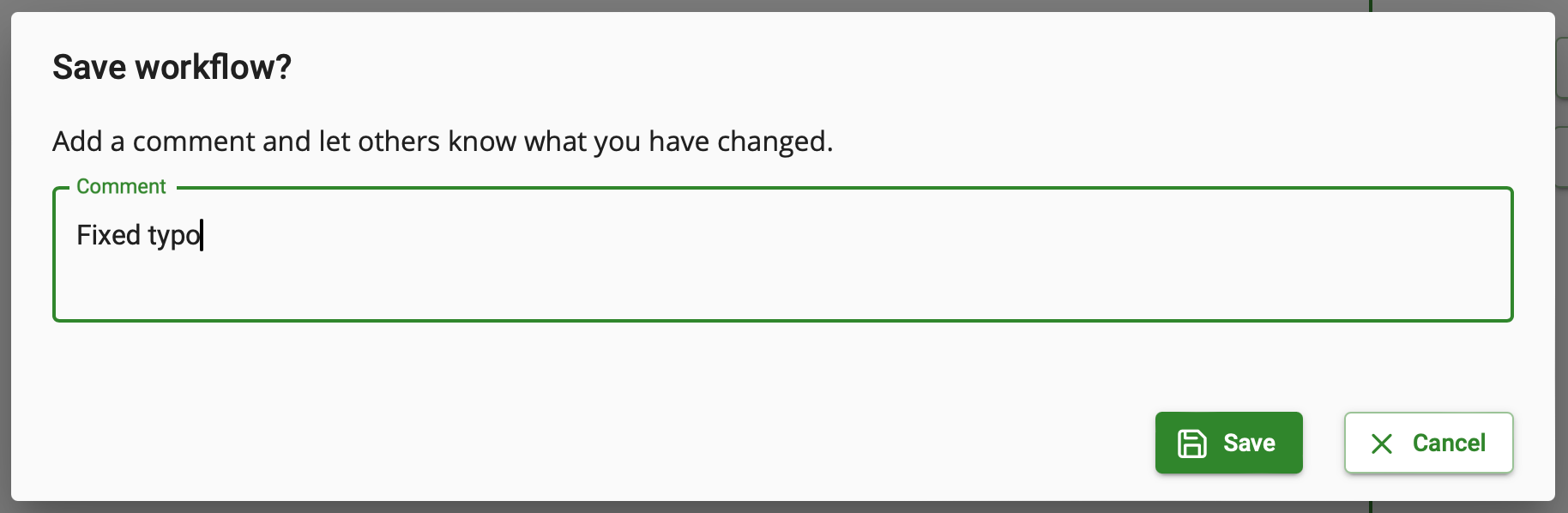
Whenever workflows and templates are saved, a version history is now automatically created. This allows you to track all changes at any time. Additionally, comments can be added during each save – perfect for documenting minor tweaks or larger modifications.
Restoring Previous Versions: Flexibility When It Matters
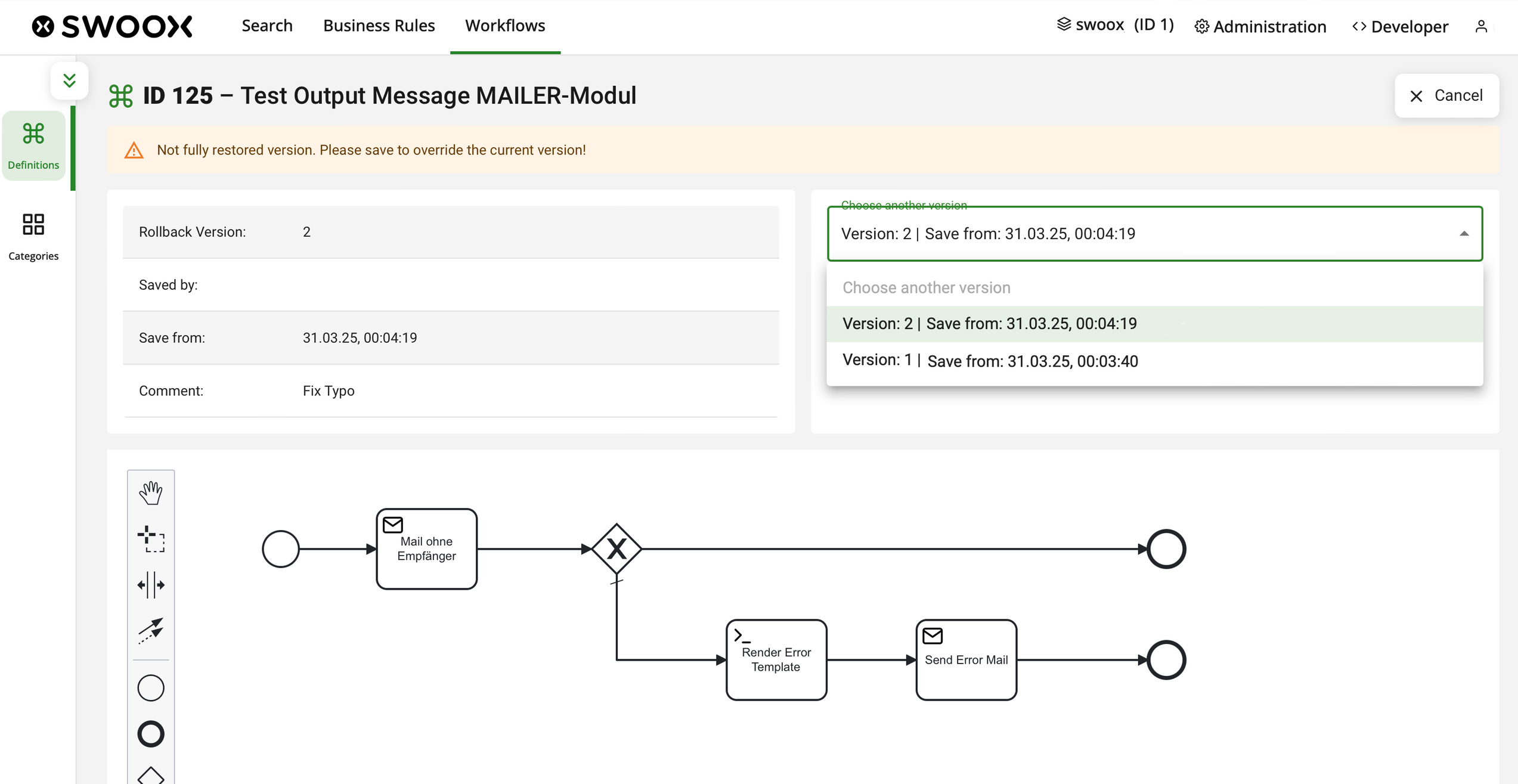
Another practical feature of the new versioning system is the ability to easily restore previous versions of workflows. If a workflow does not function as expected or a change needs to be undone, you can quickly revert to an earlier version with just a few clicks. swoox.io displays all saved versions, which can be previewed before restoring. This feature provides additional security and flexibility, allowing you to quickly retrieve a working version.
Outlook: Versioning Will Be Expanded
Currently, version control is limited to workflows and templates. In future updates, we will extend this functionality to additional areas, providing even more control over stored data and processes.
Conclusion – More Transparency and Security for Your Workflows
With the new versioning feature in swoox.io 9.5, you can keep track of all changes to your workflows. Automatic version saving and the ability to restore previous configurations ensure greater security and flexibility in your work processes.
Benefit from improved visibility and easier handling of your workflows. This ensures that your processes run smoothly at all times – without losing important data or adjustments.
Curious about this new feature?
Request a Demo Now