- Blog-Kachelbild:

With the Release 9.5.0, swoox.io introduces a flexible and fine-grained role and permission management system that serves as the foundation for even more efficient process automation. This allows access to be precisely controlled so that users only have access to the areas and actions relevant to them. The new management system offers intuitive configuration, enhanced security, and simple administration – especially for companies with multiple tenants, complex team structures, or high compliance requirements.
How does the new role & permission system work?
Permissions in swoox.io are defined on two levels:
- Function level:
Control of access to core modules such as Workflows, Business Rules, or the Search Engine – each of these areas has at least one role
- Action level:
Detailed control over which actions are allowed within a module (e.g., editing or deleting workflows) – these permissions are subordinate to the respective areas
Thanks to the new hierarchical structure, permissions can be managed efficiently and flexibly adapted to different user groups – ideal for managing complex automation processes.
Example: If a user is granted permission for the Business Rules area, they have access to all functions and actions within this area. If, in the Workflow area, only the permissions to start and monitor are to be granted, this can be set independently of the Business Rules area. This allows process automation to be controlled and optimized in a granular way.
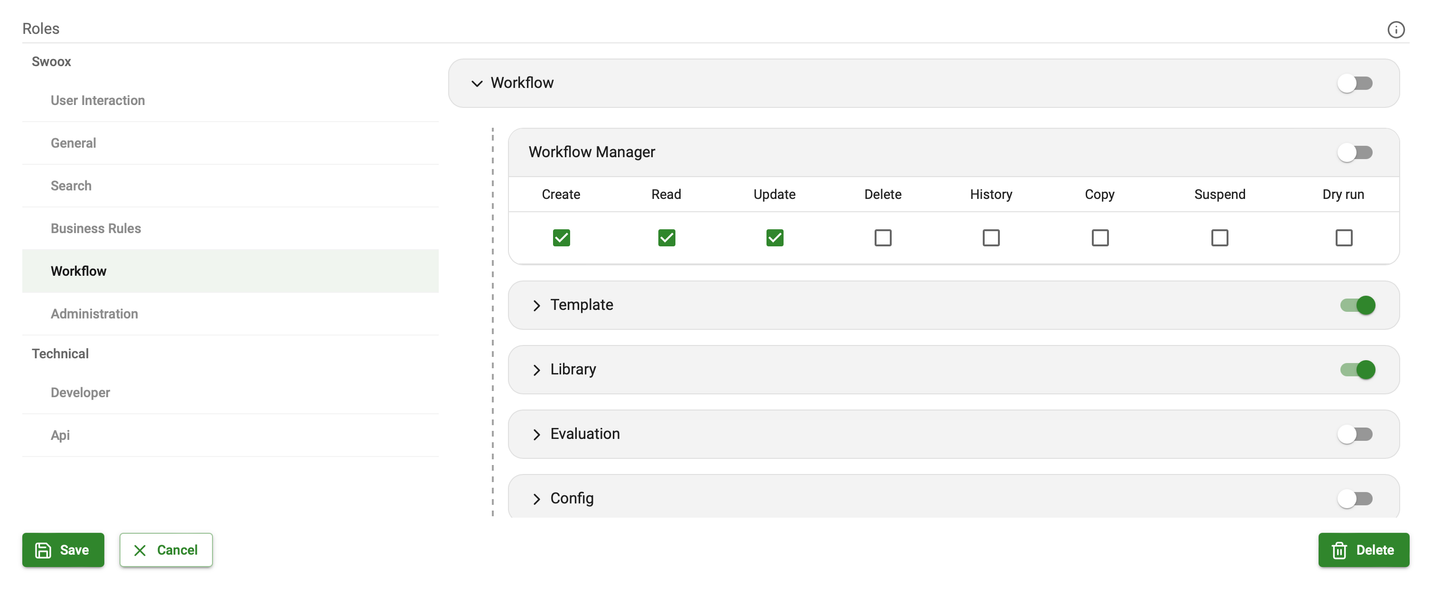
Simple administration thanks to the new UI
To minimize administrative effort, a new role management system has been integrated into swoox.io via theGroup Manager.
Here you can:
- Define and manage roles – with individually assigned permissions
- Create user groups – and assign them bundled roles
- Assign tenants to user groups – for targeted access control
Configuration is done via an intuitive UI that dynamically adapts to the available roles and enables transparent control.
Multi-tenant capability for maximum flexibility
Swoox.io makes it possible to assign rights not only to individual users but also on a tenant basis. This means that companies with multiple locations, brands, or customer projects can precisely control who has access to which content and functions.
When grouping roles,user groups can be linked to one or more tenants. This allows permissions to be set either globally for all tenants or individually for each tenant and its specific automation requirements.
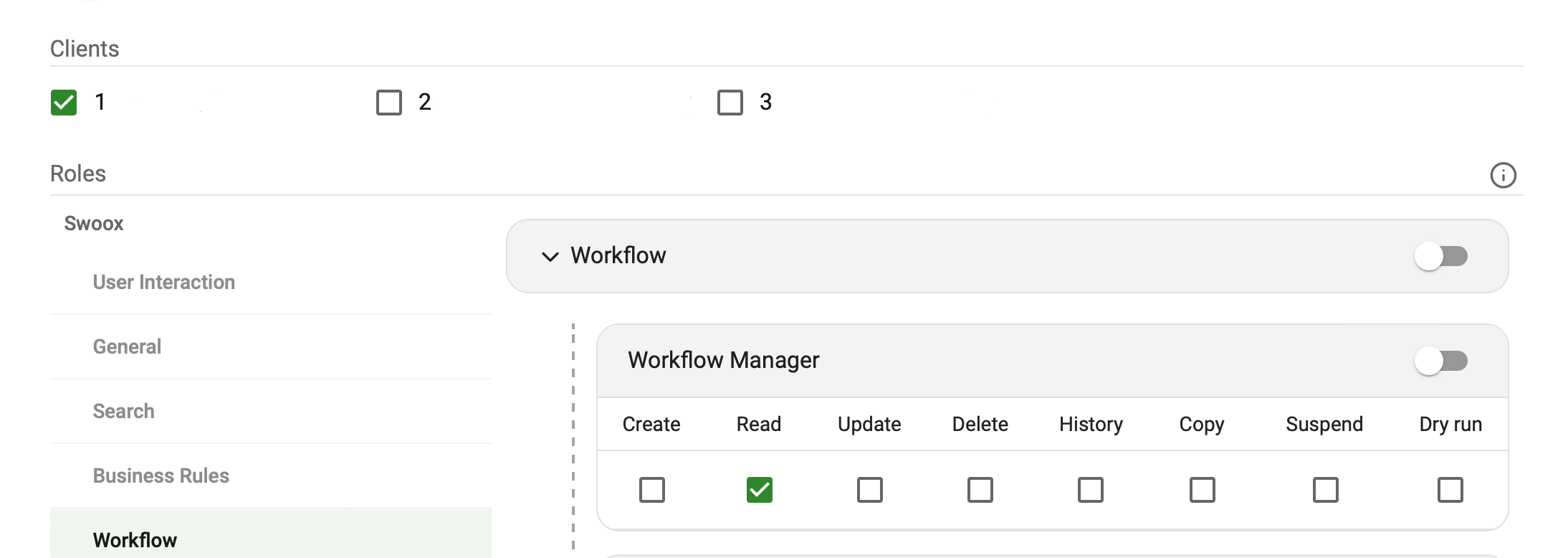
The role and permission system in swoox.io 9.5.0 thus ensures detailed and precise control of access to all functions and actions – both at the tenant and user level.
Conclusion: More control and security
The new role and permission management makes swoox.io even more powerful. You benefit from clearly structured user management, reduced error rates, and efficient organization of permissions – even in complex environments. This ensures more effective and scalable implementation of automation processes. Companies with strict compliance requirements or data security demands in particular will appreciate the new possibilities.
Curious about the new possibilities?
Request a Demo Now
- Blog-Kachelbild:

The last release was not long ago, and swoox.io 9.3 is already in the starting blocks. In this article, you can find out which four new features have been integrated and which improvements increase user-friendliness and expand flexibility.
Highlights of the release
New Features:
- Change log: Change history in the administration menu and in views
- Template manager: Copy function for templates
- API: GraphQL queries in the RESTful API
- Workflows: Quality assurance in the deployment process
Further improvements:
- General: General improvements have been implemented to further increase user-friendliness
- Workflows: New date filter
- Change lists: New filter functions in both the history and category selection
Security & bug fixes:
- General: Security updates and bug fixes for greater stability and reliability
New features in detail
1. Change history in the administration menu and in views
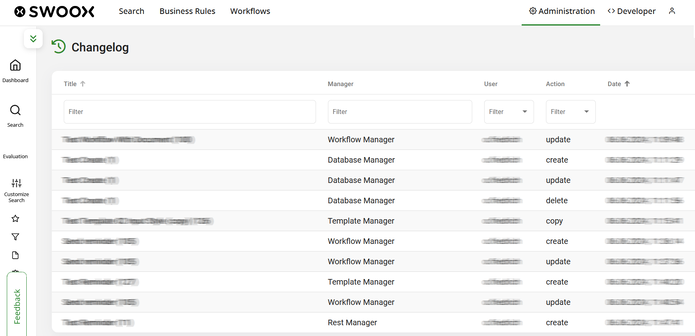
The new change log in the administration menu enables comprehensive monitoring and management of all changes on the platform. This feature simplifies troubleshooting and makes it easier to track adjustments. In addition, a change history has been integrated into the table overviews in the workflow area. This allows users to view and track changes to a data record.
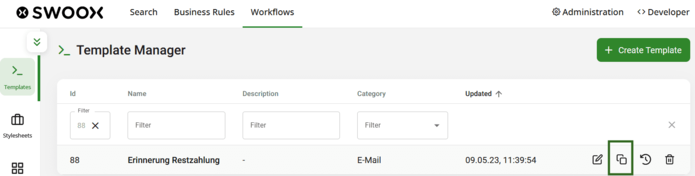
2. Copy function for templates in the Template Manager
The copy function already available in the Workflow Manager is now also available in the Template Manager. This means that email templates, for example, can be easily copied, customized if necessary, and integrated into a workflow. This greatly simplifies working with templates and saves time.
3. GraphQL queries in the RESTful API
In addition to the existing request formats JSON, CSV, and XML, swoox.io now also supports GraphQL requests. This allows additional external data sources and systems such as Pimcore to be connected and integrated into workflows, which significantly improves the connectivity and interoperability of our platform. It is also possible to update data in remote systems via GraphQL.
4. Quality assurance in the deployment process
A new test stage in the pipeline provides additional stability. Automated tests comprehensively check code and complex user-specific workflows before release. This ensures that the system and its rules and workflows continue to function flawlessly.
Improvements
In addition to the new features, various improvements have been implemented to further enhance user-friendliness. These include the new date filter, which allows users to filter their data according to specific time periods. Furthermore, the filter functions have been expanded in both the Change Listener history and the category selection. Several bug fixes and security updates have also been incorporated to further ensure stability and reliability.
Try release 9.3.0 and experience the new possibilities for yourself!
Request a demo
- Blog-Kachelbild:
With version 9.5.0, swoox.io receives a comprehensive feature update that makes everyday work much easier. The new role and permission management provides precise control over access rights – even in complex setups. The introduction of versioning ensures more transparency and traceability when working with workflows and templates. And with the newUser Interactions, swoox.io becomes more interactive and even more flexible in use.
This release is all aboutcontrol,traceability anduser centricity. In this article, you will find a compact overview of the most important new features. More detailed information on the key functionalities will be provided in separate articles.
Release Highlights
New Features
- Role and Permission Management: A fine-grained system for controlling access rights
- Versioning: Workflows and templates now have version management
- User Interactions: Workflows can now interact directly with users
- Translations: swoox.io is now available in English and German
- Workflow Schema Validation: Changes in module outputs are highlighted
Other Improvements
- General:Performance optimization
- Workflows:General optimizations
- Workflows:Extensions in the mailer module and mail templates
- Change Listener: General improvements
Security
- General: Security updates
- Workflows:Extended code coverage
Bugfixes
- General: Bug fixes for increased stability and reliability
New Features in Detail
1. Role and Permission Management
With the new role and permission system, access to different areas and actions in swoox.io can be precisely controlled. It allows for granular assignment of permissions at functionality and action level. In addition, the system is multi-tenant capable, so permissions can be assigned individually for single or multiple tenants.
Management is handled via a new UI in the Group Manager, which enables easy configuration.
Learn more in the detailed article onRole and Permission Management.
2. Versioning
The new version management enables seamless documentation of changes to workflows and templates. Users can restore saved versions and add comments to their changes.
Find all details in the article onVersioning.
3. User Interactions
With the new user interactions, workflows can be paused to wait for user input. A special user task makes it possible to configure input fields, the data of which then flow into the workflow.
Read more about possible use cases in the article onUser Interactions.
Next Steps & Feedback
We continuously develop swoox.io further. Upcoming features include, among others, theautomatic adjustment of UI elements to permissions.
Do you have suggestions or feedback on this release? We look forward to hearing from you!
Curious about the new possibilities?
Request a Demo Now
- Blog-Kachelbild:

swoox.io, our versatile platform for managing business rules, has been upgraded to version 9.0. What’s new? A powerful Workflow Engine! Now swoox.io can not only manage business rules but also precisely control the steps and processes of these rules and execute them automatically.
With the extension of our Business Rules Engine to include workflow management, swoox.io can do even more. The graphical representation of processes not only enables consistent handling of tasks but also reduces their lead times. Thanks to this new feature, workflow automation becomes not only more efficient but also significantly simplifies complex operations. Discover what this innovation entails and which additional features swoox.io now offers.
What is a Workflow and Why is Workflow Management Important?
A workflow, or business process, consists of consecutive, interdependent steps. Think of sending customer emails, approving an order, or requesting spare parts – all of these are workflows. Often, specific conditions must be set that determine whether the next step will follow or not.
Workflow management plays a crucial role in handling these complex processes. It enables structured analysis and planning of workflows, simulation of different scenarios, targeted control of operations, and seamless activity logging. By integrating process participants and electronic systems, workflow management ensures efficient, transparent, and well-coordinated execution of business processes.
The swoox.io Workflow Engine in Focus
The swoox.io Workflow Engine forms the heart of our workflow management. It provides a clear overview of existing business processes, connections, and dependencies, while enabling comprehensive documentation, coordination, and effective management for optimized business performance.
Thanks to the visual representation of workflows and the intuitive drag & drop feature, our users can easily design and adjust their workflows themselves. Multiple process participants, regardless of their location or department, can collaboratively work on individual steps of a process, configure the process flow independently, and monitor it comprehensively at any time.
The greatest advantage of the swoox.io Workflow Engine lies in the fully automated execution of business processes, where each step and condition is transparently followed. This leads to a significant increase in efficiency and enables time-saving, precise execution of complex processes without manual effort or errors.
Why Choose swoox.io 9.0?
The enhanced version of swoox.io not only offers a visually appealing display of workflows but also intuitive operation. Users can map and optimize their processes without technical expertise.
Overall, swoox.io 9.0 means more power, more control, more efficiency. Automate your processes now – with the perfect combination of Business Rules and Workflow Engine!
Request a Demo Now
- Blog-Kachelbild:

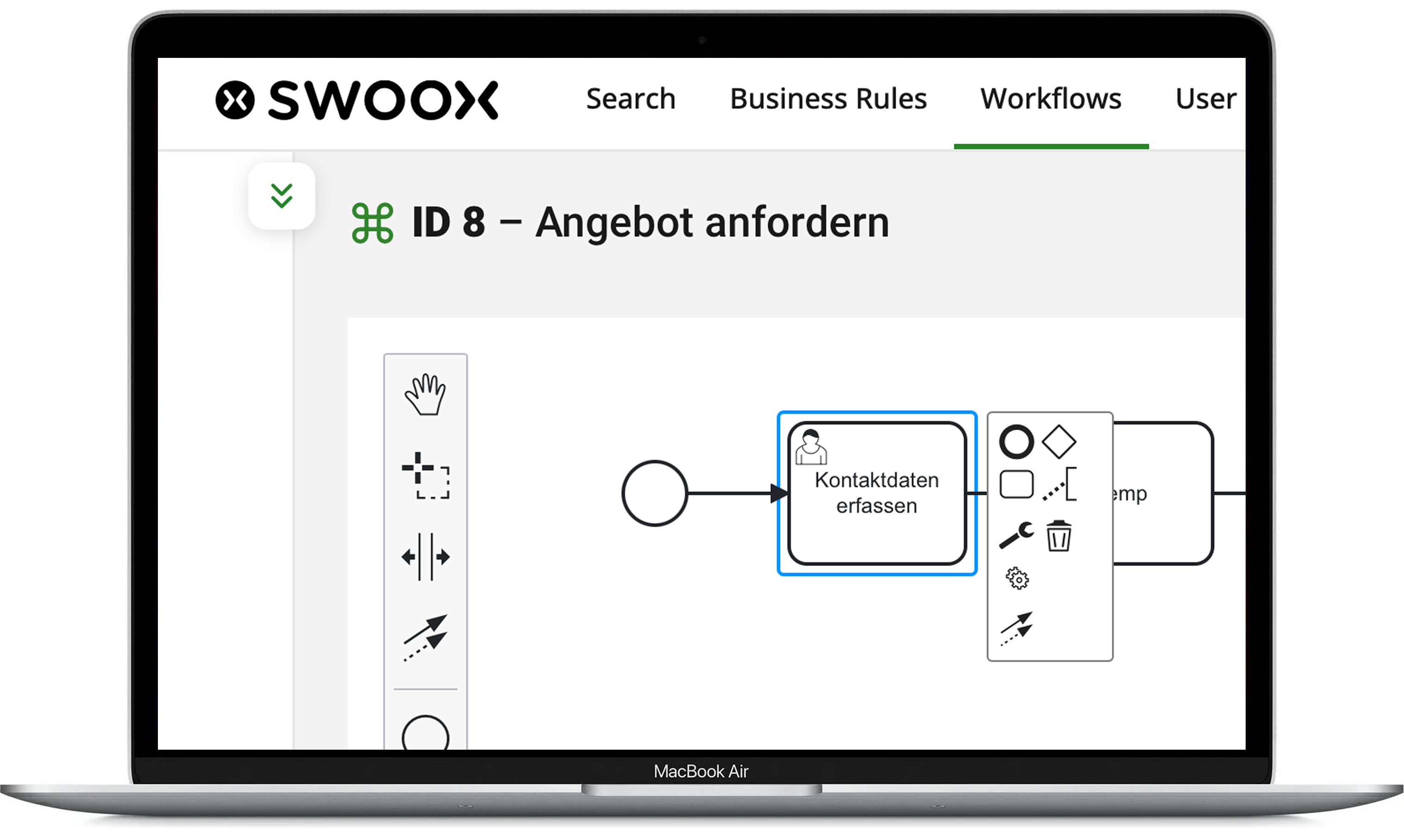
With the new User Interaction module in swoox.io 9.5.0, you can pause workflows at specific points to request manual data input from the user. This feature increases flexibility, ensures user-friendly interaction, and simplifies the integration of user feedback into automated processes.
The User Interaction module is designed for companies that not only want to automate their workflows but also require user-specific input. Especially in processes where certain data needs to be manually reviewed or added, this feature offers great benefits. Typical scenarios include approval processes, order handling, or the collection of specific user information in various use cases.
What is User Interaction and how does it work?
TheUser Interaction module in swoox.io allows workflows to be paused at defined points so users can manually enter the required information. This is achieved through a new task that can be integrated into your workflow.
How it works:
- Pausing the workflow: At a defined point, the workflow is stopped and the user is prompted to enter the required data.
- User-friendliness: The input mask is clear and focuses only on the necessary fields, so the user is not overwhelmed with unnecessary information.
- Data validation: After entry, the data is validated to ensure correctness.
- Seamless integration: Once the data has been entered and validated, the workflow continues seamlessly.
Typical use cases
Approval processes
In an automated approval process, aUser Interaction can be used to enable the approval of decisions or documents. The workflow is paused at a certain point to request user approval before continuing.
Order processes
When handling orders, aUser Interaction can be used to ensure that all relevant information (e.g., delivery address, payment details) is entered before final processing.
Data collection
In processes where specific user data must be collected – for example, in surveys or forms – aUser Interaction ensures that users can conveniently and efficiently provide the required data.
Conclusion – More flexibility and user focus
The introduction of theUser Interaction module in swoox.io makes workflows even more user-friendly by integrating manual input at the right time into the automated process. This feature provides greater flexibility and better alignment with the needs of your users and processes.
Take advantage of this new capability to make your workflows more interactive and efficient. With User Interaction, we provide you with a powerful tool that aligns your automation processes even more closely with your requirements.
Curious about the new possibilities?
Request a Demo Now
- Blog-Kachelbild:

With the new release of swoox.io 9.5.0, our automation platform introduces a key enhancement: versioning of workflows and templates. From now on, changes can be tracked, documented, and previous versions restored if needed.
This is a major advantage, especially for teams that work on workflows regularly. Versioning provides better oversight, simplifies troubleshooting, and ensures that no changes are lost.
Automatic Version History: Keep All Changes in View
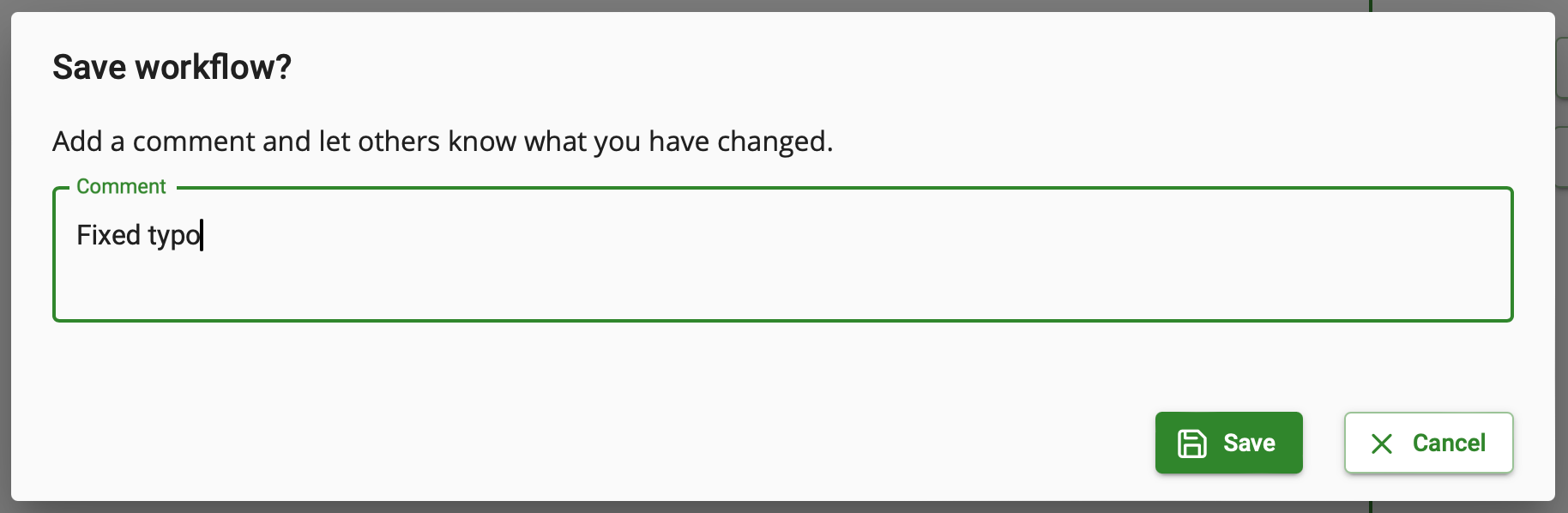
Whenever workflows and templates are saved, a version history is now automatically created. This allows you to track all changes at any time. Additionally, comments can be added during each save – perfect for documenting minor tweaks or larger modifications.
Restoring Previous Versions: Flexibility When It Matters
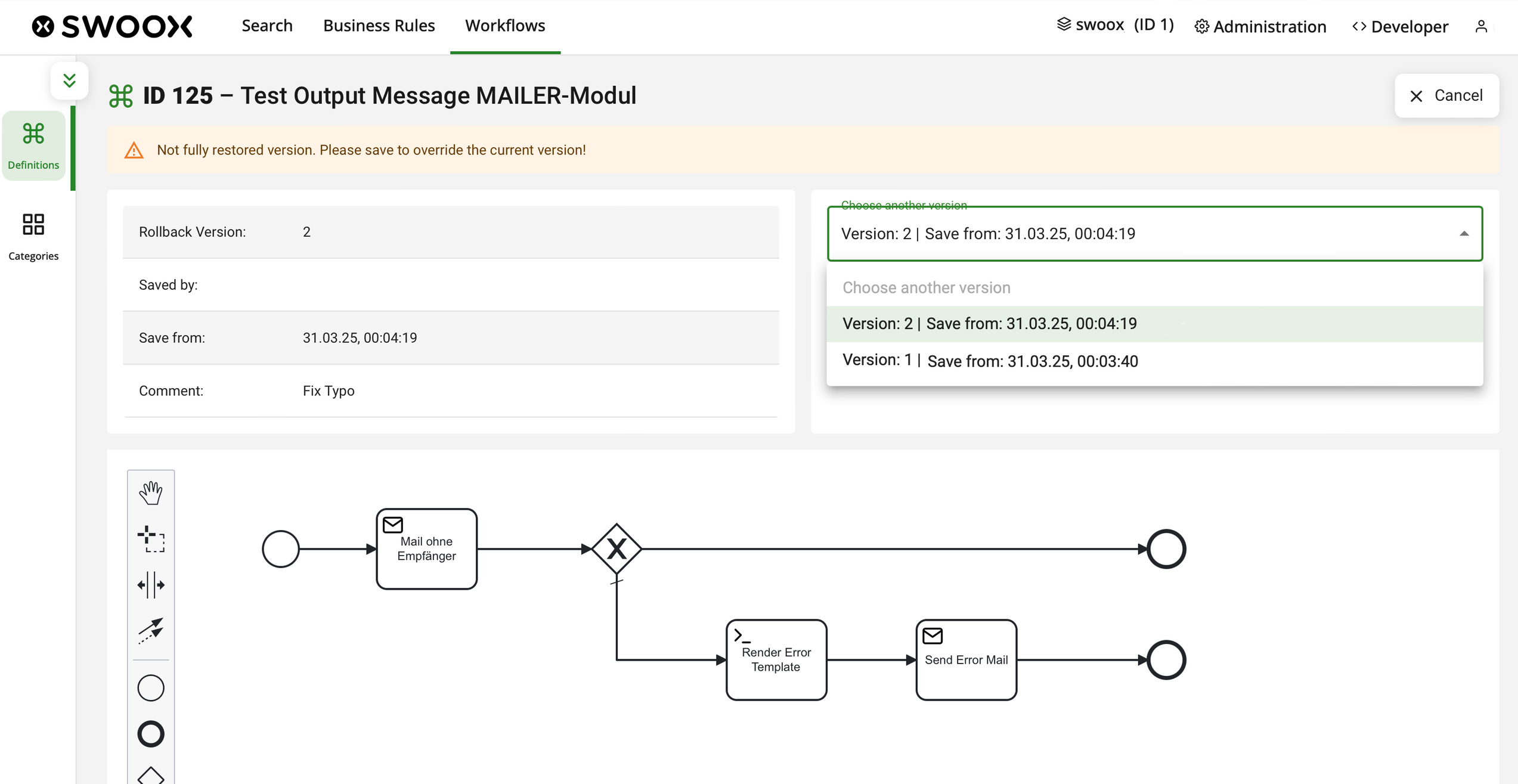
Another practical feature of the new versioning system is the ability to easily restore previous versions of workflows. If a workflow does not function as expected or a change needs to be undone, you can quickly revert to an earlier version with just a few clicks. swoox.io displays all saved versions, which can be previewed before restoring. This feature provides additional security and flexibility, allowing you to quickly retrieve a working version.
Outlook: Versioning Will Be Expanded
Currently, version control is limited to workflows and templates. In future updates, we will extend this functionality to additional areas, providing even more control over stored data and processes.
Conclusion – More Transparency and Security for Your Workflows
With the new versioning feature in swoox.io 9.5, you can keep track of all changes to your workflows. Automatic version saving and the ability to restore previous configurations ensure greater security and flexibility in your work processes.
Benefit from improved visibility and easier handling of your workflows. This ensures that your processes run smoothly at all times – without losing important data or adjustments.
Curious about this new feature?
Request a Demo Now