Blog Header Alt Tag: pimcore and swoox.io logo in front of a technical background
Would you like to complete recurring tasks in your company faster and more efficiently? In this article, you will learn how the PIM system Pimcore and swoox.io work together to automate processes. Using a specific use case, we show how reorders are automatically triggered when stock levels are low – a clear example of the perfect combination of intelligent data management and efficient process automation.
Pimcore is an open-source platform for data and experience management that enables companies to centrally manage and integrate digital data and use it consistently across different channels. Swoox.io is a no-code platform that can be used to automate business processes and workflows. The combination of the two platforms makes it possible to digitise business processes without any programming knowledge. Digital data managed in Pimcore is transferred to swoox.io, where it serves as the basis for automating mapped business processes.
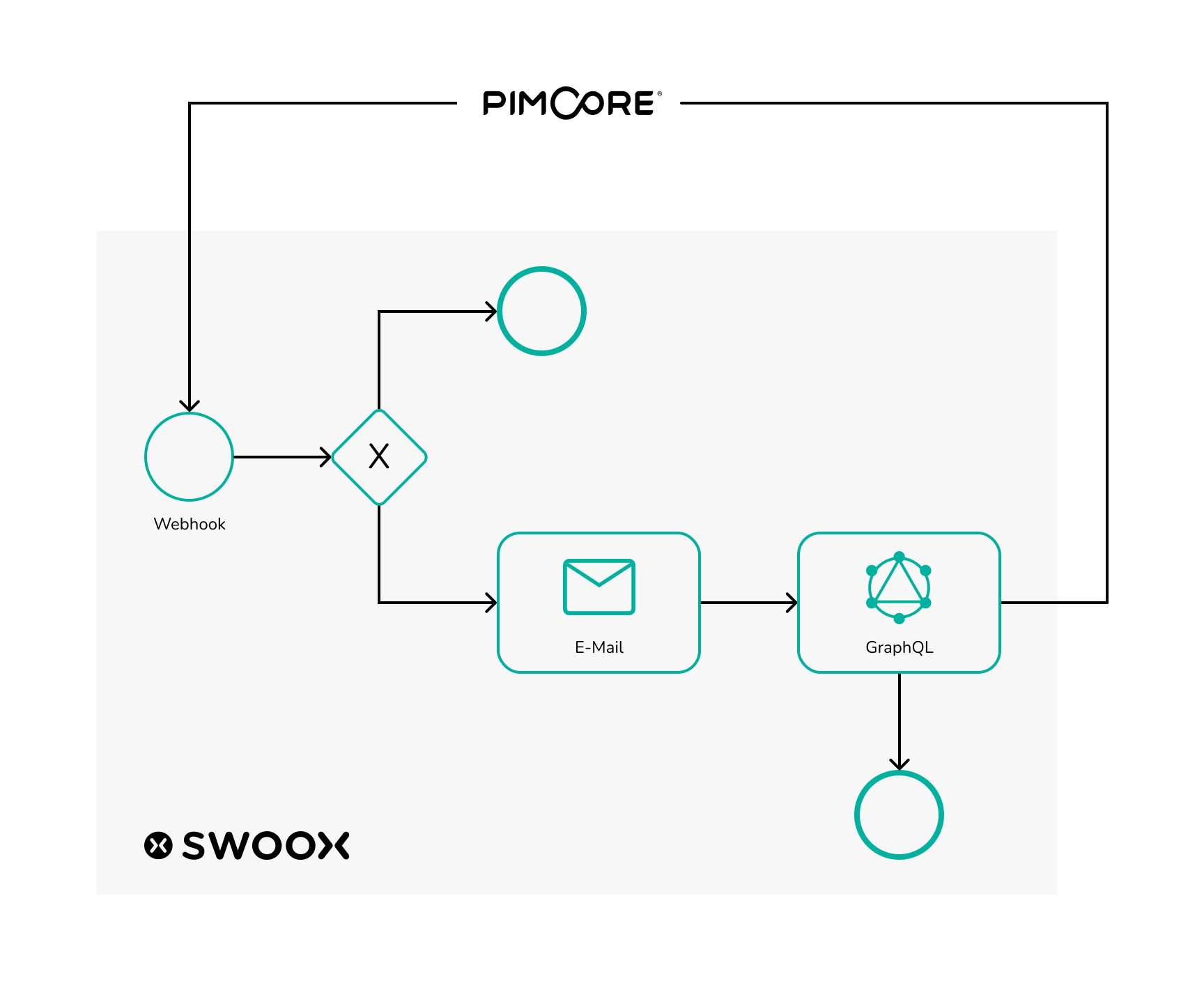
Graphic illustrating data exchange between Pimcore and swoox.io
The following use case with video tutorials provides a brief insight into the possibilities offered by the collaboration between swoox.io and Pimcore. In this use case, which is based on Pimcore demo data, swoox.io is used to reorder new vehicles when the stock level of cars at a car dealership is too low. In Pimcore, a webhook can be created for this purpose, which sends this information to swoox.io when the data in a Pimcore data object (in this case, car data) changes. Swoox.io then checks whether the inventory is too low and, if necessary, sends an email to the car manufacturer to reorder. The number of available cars is then updated using the GraphQL interface in Pimcore.
Tutorial content
Creating categories
For this use case, variables, a template and, of course, a workflow are created in swoox.io. However, before these configurations can be created, the necessary categories must be created.
Creating variables
In swoox.io, the necessary variables are first created, which will later be needed for the template, among other things. The name of the car manufacturer's contact person, the permanently required number of cars, and the email addresses of the car dealership and the car manufacturer should be reusable and easy to maintain, which is why they are created as variables. The video only shows how to create the contact person for the car manufacturer. The procedure is similar for the other variables.
Create template
Once the variables have been created, the next step is to create the template. The template will later be sent as an email in the workflow to inform the car manufacturer that new cars are to be ordered.
Create API request task
In the workflow, later, we want to work with the data which Pimcore sends to the workflow. To enable this, an API Request configuration must be created in swoox.io. The data format used in the video can be obtained via the Pimcore webhook.
Create a REST Task
The workflow is not only to work with data from Pimcore, but also to send data back to Pimcore, in order to increase the number of available cars again. To communicate with the GraphQL interface of Pimcore, a REST configuration is set up in swoox.io that sends data to the previously created GraphQL interface in Pimcore.
Creating math task
Within the workflow, a calculation must be made to determine how many cars need to be reordered in order to get back to the desired stock quantity. This can be achieved in swoox.io via a Math configuration.
Creating workflow
In the next step, the workflow itself can be built.
Linking workflow with API
Once the workflow is created, in the last step the workflow can now be connected to the Pimcore webhook. For this, a configuration must be made in the API Manager.
Demo of the interaction between swoox.io and Pimcore
With all configurations in place, the workflow is ready to use. In Pimcore, you can now set the number of any car to below five. In the swoox.io log you can check whether the workflow ran without errors. If the workflow ran successfully, in Pimcore the number of available units of the car is reset to five.
Are you ready to get started? We’ll show you how swoox.io can master your individual use case.
The swoox.io Pimcore integration is now officially available in the Pimcore Store. This allows processes to be automated directly from Pimcore and existing system landscapes to be seamlessly connected without the need for individual software development.
With its release in the Pimcore Store, the integration is available as a standardised and maintainable solution and can be easily integrated into existing Pimcore setups.
What does this mean for Pimcore users?
The integration meets the key requirements of modern Pimcore projects:
Standardised installation via the Pimcore Store
Maintainability and updateability according to Pimcore standards
Seamless integration into existing Pimcore architectures
Scalability for growing process and system landscapes
For companies, this means a reliable solution that grows with their business and technical requirements over the long term.
Pimcore as a data management hub – enhanced by process automation
Pimcore is the central platform for product and master data, content and digital assets in many companies. The swoox.io integration expands this role: Changes in Pimcore can be used specifically to trigger automated workflows or to pass on information to other systems in a structured manner.
This creates a clear separation between data management and process logic – without media breaks and without individual special solutions.
Typical areas of application
Among other things, the integration can be used to:
Automatically trigger processes when changes are made to data objects or content
Transfer information from Pimcore to third-party systems
Control cross-system processes in a structured manner
Our use case demonstrates how this approach works in practice and which processes can be automated with it. More details can be found in our reference case “How Pimcore and swoox.io streamline digital workflows”.
The swoox.io Pimcore integration in action
Experience how Pimcore and swoox.io interact and how processes are automatically triggered from data management.
Video: swoox.io Pimcore integration – demo
From idea to implementation
Our tutorial shows you how to set up the integration and what steps are necessary: Step-by-step instructions
Now available in the Pimcore Store
The swoox.io Pimcore integration is now available and can be used directly in Pimcore projects.
Blog Header Alt Tag: Rules Engine represented as a gear in a data network
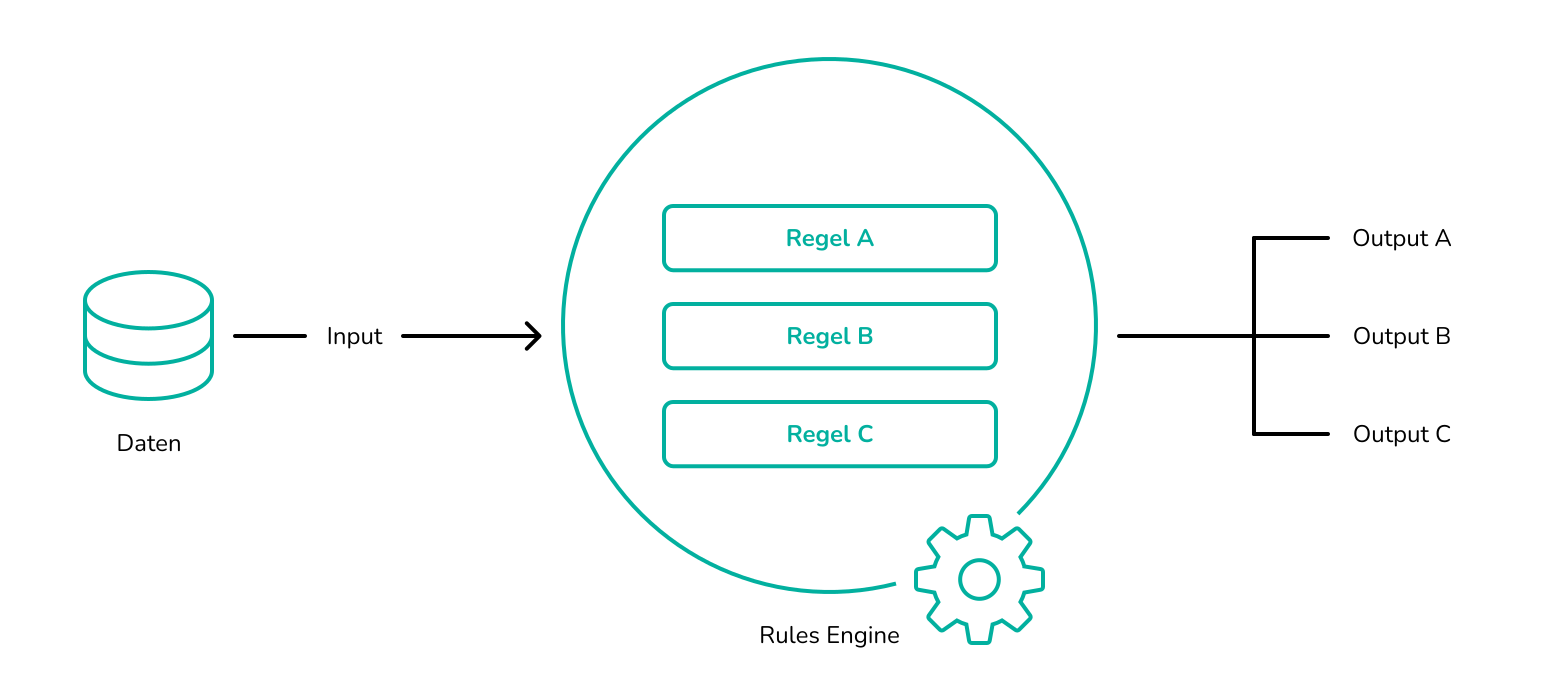
A Business Rules Engine (BRE) is a tool for automating and centrally managing a company's business processes and rules. Business rules based on logic can be defined, supplemented, modified, analyzed, and reviewed flexibly. Actions are executed based on established "IF-THEN" conditions, creating reusability that replaces manual data maintenance. Above all, a BRE ensures faster handling of recurring tasks and rule changes through process automation.
A Business Rules Engine uses imported data as the basis for business rules. These rules can, in turn, be linked with various applications to trigger the desired actions there.
A Business Rules Management System (BRMS) is the platform in which business rules can be defined and triggered by a Rules Engine (independent of the applications used). In the BRMS, the business rules are ultimately stored and centrally managed, independent of external programs and applications. Especially when working with large and diverse databases, a Business Rules Engine offers a significant advantage for companies as it can save time, costs, and resources.
What are Business Rules?
Millions of decisions need to be made every day. In most cases, this happens based on rules established for the business system and a defined decision logic. Business rules, also called rules, are present in almost every area of a company and are as diverse as the company itself. Business rules often describe the regulations needed to automate processes in a company. Through simple IF-THEN conditions, business rules can simplify processes and enable them to be executed more quickly.
Examples of business rules:
The sales department of a company must determine the credit limit for a new customer.
The HR department must decide whether a candidate will continue in the application process.
It must be checked whether all policies are being followed.
The purchasing department of a company must determine whether a supplier meets certain requirements.
A concrete example of a business rule in customer service could look like this:
IF a customer navigates on the FAQ page of a company,
THEN assistance is offered via a chat bot.
This reduces the volume of inquiries, as many questions may already be answered in advance by the automated chat bot, relieving the responsible employees.
What are the benefits of a Business Rules Engine?
A Business Rules Engine automates business rules and processes, enabling dynamic processes that can be executed quickly and flexibly. Because of these adaptable rules, reusability is created that can be implemented company-wide and replaces previously used lists. Multi-source control allows companies to automate processes based on neutral data from various sources. These data and processes can be analyzed, optimized, and measured for results using a BRE. A Business Rules Engine provides increased independence from the IT department by allowing rules to be defined and modified easily. Changes and responses can thus occur simultaneously and individually. Errors that often result from manual data maintenance are reduced, and more time is created for other activities. From error minimization and consistent compliance with guidelines, increased security results. Even in emerging technologies such as Artificial Intelligence, Business Rules Engines can be used to manage the complex logic of systems more easily. A Business Rules Engine is versatile, as automated processes can be applied, for example, in pricing an online shop, in approval processes for travel expense reports, or in compliance with regulations and guidelines.
What can swoox.io do?
swoox.io is a no-code Business Rules Engine that can search, filter, structure, compare, and process large amounts of data with differently structured datasets based on logical conditions. On this data foundation, processes are created that can be digitized and automated. With more than 100 connectors, swoox.io offers a wide range of possibilities to utilize data and also use it for analysis purposes. Whether in marketing, customer service, or dynamic pricing, swoox.io can automate any process based on data, as it is universally applicable. Using swoox.io, various valuable parameters such as customer needs and quality checks can be considered and integrated into business processes. By separating execution code from the rest of the business process management, rules can also be modified without programming knowledge, achieving independence from the IT department.
swoox.io is easy to implement into an existing company structure, simple to use, and thus simplifies ongoing tasks, creating more time and space for other valuable activities.