Would you like to complete recurring tasks in your company faster and more efficiently? In this article, you will learn how the PIM system Pimcore and swoox.io work together to automate processes. Using a specific use case, we show how reorders are automatically triggered when stock levels are low – a clear example of the perfect combination of intelligent data management and efficient process automation.
Inhaltsverzeichnis
Introduction
Pimcore is an open-source platform for data and experience management that enables companies to centrally manage and integrate digital data and use it consistently across different channels.
Swoox.io is a no-code platform that can be used to automate business processes and workflows.
The combination of the two platforms makes it possible to digitise business processes without any programming knowledge. Digital data managed in Pimcore is transferred to swoox.io, where it serves as the basis for automating mapped business processes.
Our guide to process automation explains which processes are a good fit and how to get started.
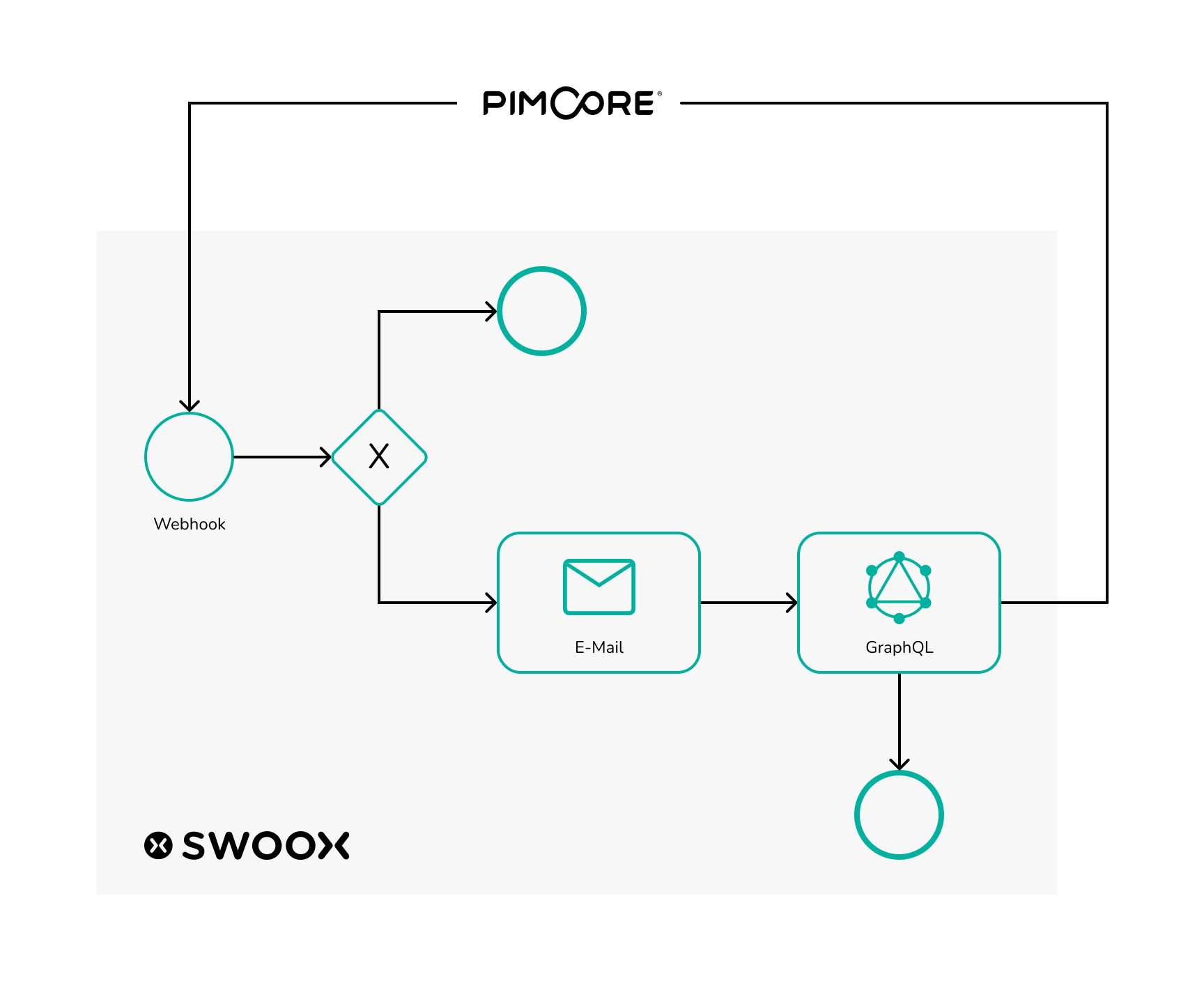
The following use case with video tutorials provides a brief insight into the possibilities offered by the collaboration between swoox.io and Pimcore.
In this use case, which is based on Pimcore demo data, swoox.io is used to reorder new vehicles when the stock level of cars at a car dealership is too low.
In Pimcore, a webhook can be created for this purpose, which sends this information to swoox.io when the data in a Pimcore data object (in this case, car data) changes. Swoox.io then checks whether the inventory is too low and, if necessary, sends an email to the car manufacturer to reorder. The number of available cars is then updated using the GraphQL interface in Pimcore.
Tutorial content
Creating categories
For this use case, variables, a template and, of course, a workflow are created in swoox.io. However, before these configurations can be created, the necessary categories must be created.
Creating variables
In swoox.io, the necessary variables are first created, which will later be needed for the template, among other things. The name of the car manufacturer's contact person, the permanently required number of cars, and the email addresses of the car dealership and the car manufacturer should be reusable and easy to maintain, which is why they are created as variables. The video only shows how to create the contact person for the car manufacturer. The procedure is similar for the other variables.
Create template
Once the variables have been created, the next step is to create the template. The template will later be sent as an email in the workflow to inform the car manufacturer that new cars are to be ordered.
Create API request task
In the workflow, later, we want to work with the data which Pimcore sends to the workflow. To enable this, an API Request configuration must be created in swoox.io. The data format used in the video can be obtained via the Pimcore webhook.
Create a REST Task
The workflow is not only to work with data from Pimcore, but also to send data back to Pimcore, in order to increase the number of available cars again. To communicate with the GraphQL interface of Pimcore, a REST configuration is set up in swoox.io that sends data to the previously created GraphQL interface in Pimcore.
Creating math task
Within the workflow, a calculation must be made to determine how many cars need to be reordered in order to get back to the desired stock quantity. This can be achieved in swoox.io via a Math configuration.
Creating workflow
In the next step, the workflow itself can be built.
Linking workflow with API
Once the workflow is created, in the last step the workflow can now be connected to the Pimcore webhook. For this, a configuration must be made in the API Manager.
Demo of the interaction between swoox.io and Pimcore
With all configurations in place, the workflow is ready to use. In Pimcore, you can now set the number of any car to below five. In the swoox.io log you can check whether the workflow ran without errors. If the workflow ran successfully, in Pimcore the number of available units of the car is reset to five.
Are you ready to get started?
We’ll show you how swoox.io can master your individual use case.


We would be happy to show you how easy and flexible process automation with swoox.io is.
Or you can try it out for yourself right away.