Once a process has more than two steps and involves several people or systems, it gets hard to follow. Who is working on it right now? Where is the request stuck? Has the invoice been approved yet? A workflow engine answers these questions. It runs processes based on a fixed model and keeps track of every single case.
In this article, you will learn how a workflow engine works, where it is typically used and how it differs from a rules engine.
What is a Workflow Engine?
A workflow engine is software that runs and controls business processes automatically. It works from a process model. The model defines which steps happen in which order, who is responsible for each step and which systems are involved.
The engine makes sure that this model is actually followed. It assigns tasks, waits for responses, calls other systems and records every step. This turns a process description on paper into a process that really runs.
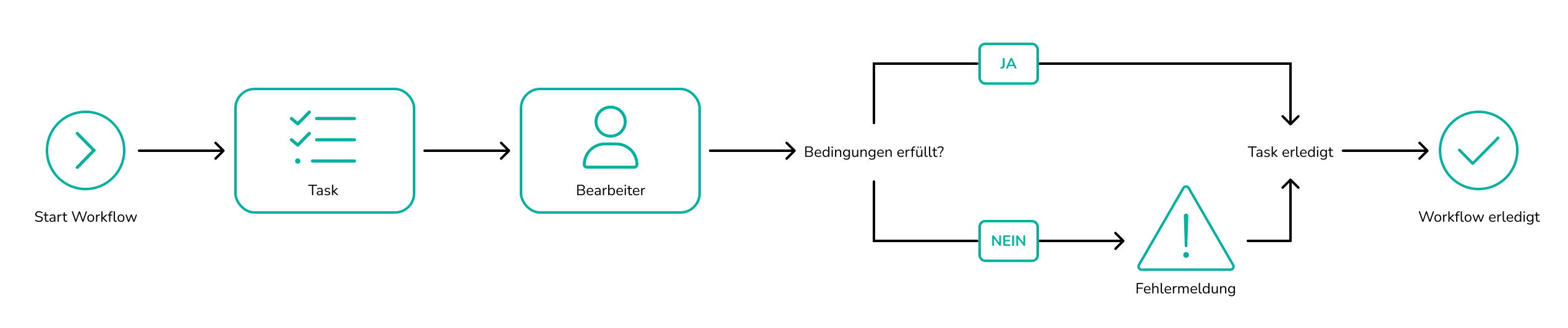
How does a workflow engine work?
It all starts with the process model. Most modern systems use BPMN 2.0, the international standard for process diagrams. The model is not just documentation. It is the direct instruction for the engine.
When a process starts, for example with a new request or an incoming order, the workflow engine creates a process instance. Each instance runs on its own. The engine always knows which step a case is in
The engine takes care of four things:
- Assigning tasks: Human steps, such as an approval, go to the right person or role.
- Connecting systems: The engine calls interfaces, for example to an ERP, a CRM or a PIM such as Pimcore.
- Watching deadlines: Reminders and escalations run automatically.
- Keeping records: Every step is logged. You can see who did what and when.
When the process branches, the engine checks conditions to decide which path comes next. When these decisions get complex, a business rules engine takes over this part.
Examples of workflow engines in use
Employee onboarding. Send the contract, create user accounts, order hardware, plan the first day. HR, IT and the team lead work one after another and sometimes at the same time. The workflow engine makes sure nothing gets lost.
Invoice approval. An invoice comes in, is checked and then approved by one or more people, depending on the amount. If an approval takes too long, the engine sends a reminder or escalates to a deputy.
Order processing. Check the payment, inform the warehouse, start shipping, notify the customer. Several systems are involved, and the engine keeps them in the right order.
Product data management. A new product is created in Pimcore. The workflow engine starts the translation, collects approvals from marketing and product management and then sends the data to the online shop.
Workflow engine vs. rules engine
The two terms are often used together, but they do different jobs. The workflow engine controls the process. The rules engine makes decisions within that process, for example whether a request is approved or needs a manual check. To learn how a rules engine works in detail, read our article What is a business rules engine?
| Workflow Engine | Rules Engine | |
| Job | Controls the process | Makes decisions |
| Based on | Process model (BPMN) | Set of rules (if-then rules) |
| Typical question | What happens next and who is responsible? | What is the result for this case? |
| Duration | Hours to weeks per case | Milliseconds per decision |
| People involved | Yes, often with tasks and approvals | Usually not |
| Example | Leave request from submission to calendar entry | Check if enough leave days are left |
When do you need which?
A workflow engine is the right choice when your process has several steps in a fixed order and involves different people or systems. The process is clear and the handovers are defined.
A rules engine is the better fit when the real challenge is the decision logic and this logic changes often. Typical examples are pricing rules, credit checks or compliance requirements.
In practice, most companies need both. A loan application, for example, follows a fixed workflow: receive, check, decide, notify. In the check step, the workflow engine sends the data to the rules engine. The rules engine evaluates the case and returns a result. The workflow then continues based on that result. The process stays clear, and the rules can be changed on their own.
The workflow engine in swoox.io
Since version 9, swoox.io includes its own workflow engine. You model processes visually in BPMN 2.0 with the BPMN software of swoox.io and manage decision rules in one place with the Rules Manager. Both work together and connect to your existing systems. The result is a low-code platform for process automation where processes and decisions live in one place.
Conclusion
A workflow engine turns process descriptions into real processes. It assigns tasks, connects systems and shows you at any time where a case stands. If your processes also include many decisions that change often, combine it with a rules engine. Which processes are a good fit and how to get started is explained in our guide to automating processes.
Frequently asked questions
What does a workflow engine do?
It runs business processes based on a process model. It assigns tasks, calls other systems, watches deadlines and records every step.
What is the difference between a workflow engine and a rules engine?
The workflow engine controls the flow of a process. The rules engine makes single decisions within that flow based on rules.
What does BPMN have to do with a workflow engine?
BPMN 2.0 is the standard for modelling processes. Many workflow engines can run BPMN models directly.
Do I need programming skills to use a workflow engine?
Not necessarily. Low-code platforms such as swoox.io let you model and change processes visually.


We would be happy to show you how easy and flexible process automation with swoox.io is.
Or you can try it out for yourself right away.